
How to Learn 3D Printing: A Practical Path for Hardware and Plastic Mold Fast Sampling
Author: SZTC
2026-10-14
Fast sampling is the strongest advantage a hardware machining or plastic mold shop can offer. Customers want a working sample in days, and a 3D printer is the fastest way to deliver it. But a new machine is only as useful as the people who run it. Knowing how to learn 3D printing well turns an unfamiliar tool into a dependable part of your sampling workflow. This guide gives you a clear path from your first print to reliable, customer-ready samples.

Why Learning 3D Printing Pays Off in Fast Sampling
Every printed sample begins with a skill: the ability to design a part for printing, prepare it in a slicer, and finish it cleanly. When your team learns these skills, samples get faster, cheaper, and more accurate. In a busy shop, the difference between a trained operator and a confused one can be a full day of reprints. Understanding how to learn 3D printing helps you build that skill quickly and use it where it matters most.
Skills beat hardware every time
A cheap printer run by a skilled operator often beats an expensive printer run by a beginner. Design sense, slicing choices, and maintenance habits decide print quality more than the machine itself. So when you think about how to learn 3D printing, focus on building skill and judgment, not just buying better equipment.
Learning is a process, not a single tutorial
3D printing is a craft made of many small skills: modeling, slicing, support placement, bed leveling, material choice, and post-processing. You learn each one by doing it and fixing mistakes. Expect a learning curve of a few days to a few weeks before prints become consistent.
Learn the Basics First: How a Printer Works
Before you print anything, understand the machine. Each technology builds parts in its own way, and knowing that difference is the foundation of how to learn 3D printing.
Understand the three main printing technologies
The three processes that dominate sampling are FDM, SLA, and SLS. FDM melts and deposits plastic filament layer by layer, making it fast and cheap. SLA cures liquid resin with light, producing smooth, fine detail. SLS fuses powder with a laser, building strong parts without supports. Know which one you have and what it is good at before you design for it.
Know the limits of your machine
Every printer has limits: minimum wall thickness, maximum overhang angle, and minimum feature size. Learn these limits from the manual and from practice. Designing inside them produces clean prints; designing outside them produces failures. This awareness is the first real skill you build.
Build a Learning Plan Step by Step
A structured plan turns scattered tutorials into real skill. Follow a sequence that starts simple and adds difficulty only as you master each stage.
Stage one: print pre-made files to learn the basics
Start by downloading simple, proven files and printing them exactly as the designer intended. This teaches you the full pipeline: loading the file, slicing it, starting the print, and removing the finished part. It builds confidence and shows you how a well-designed model behaves on your machine.
Learn the slicer settings that matter
While printing pre-made files, study the slicer. Understand layer height, wall count, infill, and support settings, and see how each change affects the result. These settings control speed, strength, and surface quality, and mastering them is central to learning 3D printing.
Stage two: modify an existing design
Once basic prints work, take an existing model and change one small feature, such as a hole size or a wall thickness. This teaches you how to use modeling software without starting from a blank screen. It is the gentlest way to move from printing to designing.
Practice measuring and comparing
After each modified print, measure the part against the model and note where it differs. This habit trains your eye for shrinkage and tolerance, which matters greatly when samples must fit metal parts or mold cavities.
Stage three: design your own part
When you can modify designs comfortably, design a simple part from scratch, such as a small bracket or a spacer. Follow the core rules: keep walls thick enough, avoid extreme overhangs, and account for tolerance. Your first original design will not be perfect, but each version gets better.
Iterate from measurement to improved design
Print, measure, refine, and print again. This loop is the heart of fast sampling. Because prints are cheap and quick, you can converge on a correct part in just a few rounds, and that speed is exactly what customers value.
Learn the Skills That Matter for Hardware and Mold Sampling
Not all 3D printing skills are equally useful in your industry. Focus your learning on what actually helps you produce better samples faster.
Design for fit and function, not just looks
In hardware and mold sampling, a sample must prove that a bracket fits a housing or that a prototype matches the shape of a future molded part. Learn to include mounting holes, correct boss heights, and clearances that make the test meaningful. A sample that fits builds customer trust; one that only looks right wastes time.
Understand draft and parting lines for mold work
If you print prototype parts for molds, learn about draft angles and parting lines. These ideas transfer directly from molded parts to printed ones. Showing a customer the correct geometry before the mold is cut saves far more than it costs.
Learn to prepare files cleanly
Modeling software exports an STL file that the slicer turns into a print. Learn to keep models watertight, export at a good resolution, and verify the slice before starting. These habits prevent failed prints and wasted material, which is a large part of the practical skill in 3D printing.
Use free tools to keep learning cheap
Free modeling tools like Tinkercad and Onshape, and free slicers like Cura, let you learn without extra cost. Start with these, and only move to professional tools when your workflow demands more power. This keeps your learning path affordable while you build real skill.
Learn from Every Print: Measure, Fix, Repeat
The fastest way to learn is to treat every print as a lesson. Whether a part succeeds or fails, it tells you something useful about your design, your settings, or your material.
Keep a simple log of each print
Record the model, the settings, the material, and the result of each print, including any failures and their causes. Over time, this log becomes a reference that prevents repeating the same mistake. A shop that learns from every print compounds its speed.
Diagnose common failures
Learn to recognize the usual culprits: warping from a poor base, stringing from wrong temperature, or layer separation from a weak wall. Once you can name the problem, the fix is usually simple. This diagnostic skill is what turns experience into expertise.
Improve one thing at a time
When a print fails, change only one variable at a time, whether it is temperature, layer height, or a design dimension. This makes the cause clear and avoids chasing multiple changes at once. Discipline in troubleshooting is a large part of how to learn 3D printing well.
Turn approved samples into standards
When a sample finally passes, save the design and settings as a standard for similar jobs. This builds a library of proven solutions that make every future sample faster. Your early learning becomes a reusable asset for the whole team.
Build Your Learning Around Real Sampling Jobs
The most effective learning happens on real work, not empty practice parts. Use actual customer requests to drive your training, because the stakes make the lessons stick.
Learn by solving real sampling problems
Choose a real part a customer needs and work through it completely: design, slice, print, measure, and refine until it passes. The pressure of a real deadline sharpens your judgment faster than any tutorial. This is how to learn 3D printing in a way that directly grows your business.
Train more than one person
Spread the knowledge across two or three team members so the workflow does not depend on a single person. When several people understand how to design for printing and run the machine, samples move faster and the skill becomes a shared strength.
Understand Materials to Choose the Right Filament and Resin
Materials are part of the learning path, and choosing the wrong one is a common early mistake. Each material has different strength, heat resistance, and surface finish, and the right choice depends on what the sample must do.
Match the material to the sample's job
For a rough shape check, a cheap and easy material like PLA is often enough. For a part that must withstand heat or stress, a stronger material like ABS, PETG, or nylon is a better fit. For fine-detail masters, a tough resin may serve better than filament. Learning which material fits which job saves both time and frustration.
Learn the printing conditions of each material
Every material prints at a specific temperature and speed, and some need a heated bed or an enclosure. Read the material guide, start with the recommended settings, and adjust only after you see how the part behaves. Understanding these conditions is a core part of how to learn 3D printing.
Store materials correctly to avoid waste
Filament absorbs moisture from the air, and wet filament prints poorly with bubbles and weak layers. Resin has a shelf life and must be handled safely. Learn to store materials in dry, sealed containers and to keep track of what you have. Simple storage habits prevent most material-related failures.
Start with one or two materials
Do not buy every material at once. Begin with one reliable filament and one resin, and master their behavior before expanding. A small, well-understood material set builds confidence faster than a large, unfamiliar one.
Use Communities and Resources to Accelerate Learning
You do not need to learn alone. A wide range of free resources and communities can shorten your learning curve and answer your questions quickly.
Follow trusted tutorials and documentation
Manufacturers provide manuals, setup guides, and troubleshooting pages, and many creators publish step-by-step tutorials. Start with official documentation for your machine and your slicer, then branch into community videos for specific problems. This gives you a reliable base instead of random tips.
Search forums when you are stuck
When a print fails and you cannot see why, search the same error in a 3D printing forum. Chances are someone has solved it before. Describe your machine, material, and settings, and you will often find an answer within minutes. Using the community well is a practical part of learning.
Learn with a local makerspace or class
A makerspace or short course gives you hands-on practice with expert guidance, which is far faster than trial and error alone. Many have printers you can use and mentors who can spot your mistakes. For a busy shop, this is a smart way to train staff quickly.
Share lessons inside your own team
Build a shared notebook of settings, failures, and fixes that everyone can consult. When one person solves a problem, the whole team benefits. This turns individual learning into a collective asset, which is exactly what a fast-sampling shop needs.
Conclusion: Learning Is the Real Power of Fast Sampling
When you think about how to learn 3D printing, remember that the goal is not just running a machine but mastering a skill that makes your shop faster and more reliable. Start with the basics, follow a structured plan, focus on the skills that matter for hardware and mold work, and learn from every print. Within a few weeks, you will be producing samples that win orders.
The shops that lead in fast sampling are not the ones with the biggest printers; they are the ones whose people understand the process, measure their results, and improve with every iteration. Learn these skills step by step, build a clean workflow, and let every sample teach you something new. That is how to learn 3D printing and turn it into a lasting advantage for your business.


Samuel Song Your service representative
samuel@chnzhongzhu.com WhatsApp:+86 18688963321
Specializing in zinc-aluminum-magnesium alloy die-casting processing, CNC milling, CNC turning, 3D printing, injection molding and sheet metal processing. Manufacturing services.
how to make 3d print files
How to Get a Free 3D Printer: Smart Ways to Start Fast Sampling in Hardware and Mold Shops
Related Article

Chinese manufacturing has built mature industrial clusters across the Pearl River Delta, Yangtze River Delta and inland industrial zones, serving global customers in consumer electronics, automotive, new energy, communication equipment, lighting, medical devices and industrial machinery.
china factory

Factories based in Shenzhen and the surrounding Pearl River Delta are well-known for fast response and integrated manufacturing. They serve global customers in consumer electronics, automotive, new energy, communication equipment, lighting and industrial machinery.
shenzhen factory
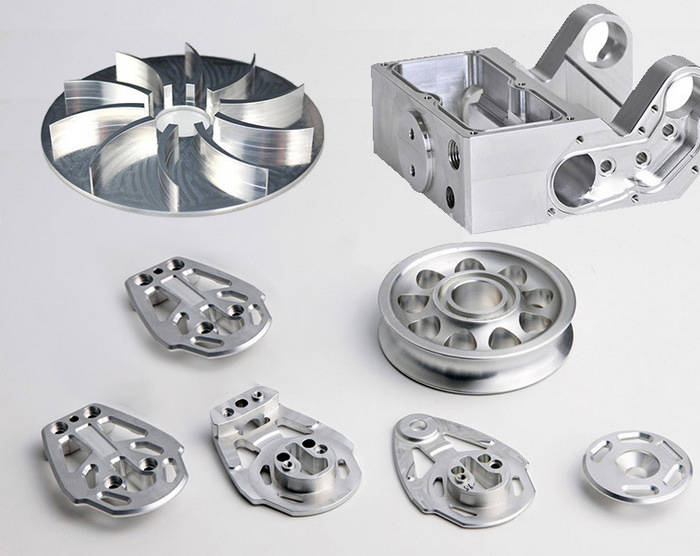
Die casting factories in the Shenzhen and Dongguan manufacturing corridor serve a wide range of sectors, including automotive parts, consumer electronics, communication hardware, pump and valve components, lighting housings and industrial brackets.
shenzhen die casting factory

Are Shenzhen die casting workshop facilities a good choice for your custom metal casting projects? It is a frequent question for purchasing managers, mechanical designers and quality engineers who source high-volume aluminum, zinc and magnesium die cast parts. Shenzhen has developed a complete industrial chain for die casting, mold making, CNC secondary machining and surface finishing.
shenzhen die casting workshop