how to print a 3d printer
How to Print a 3D Printer: A Practical Guide for Hardware and Mold Fast Sampling
Fast sampling is the fastest way to win business in the hardware machining and plastic mold industries. A 3D printer makes samples fast, and with the right approach, one printer can even produce the structural parts for another machine. Knowing how to print a 3d printer means building a working printer by printing its own frame and brackets, then assembling them with off-the-shelf parts. This guide shows you the practical path.
Understand What a Printer Can and Cannot Print
Not every printer part can be printed. Understanding the split between printed and bought parts keeps your build realistic and successful, so you do not waste time on parts that will never work.
Know which parts are printable
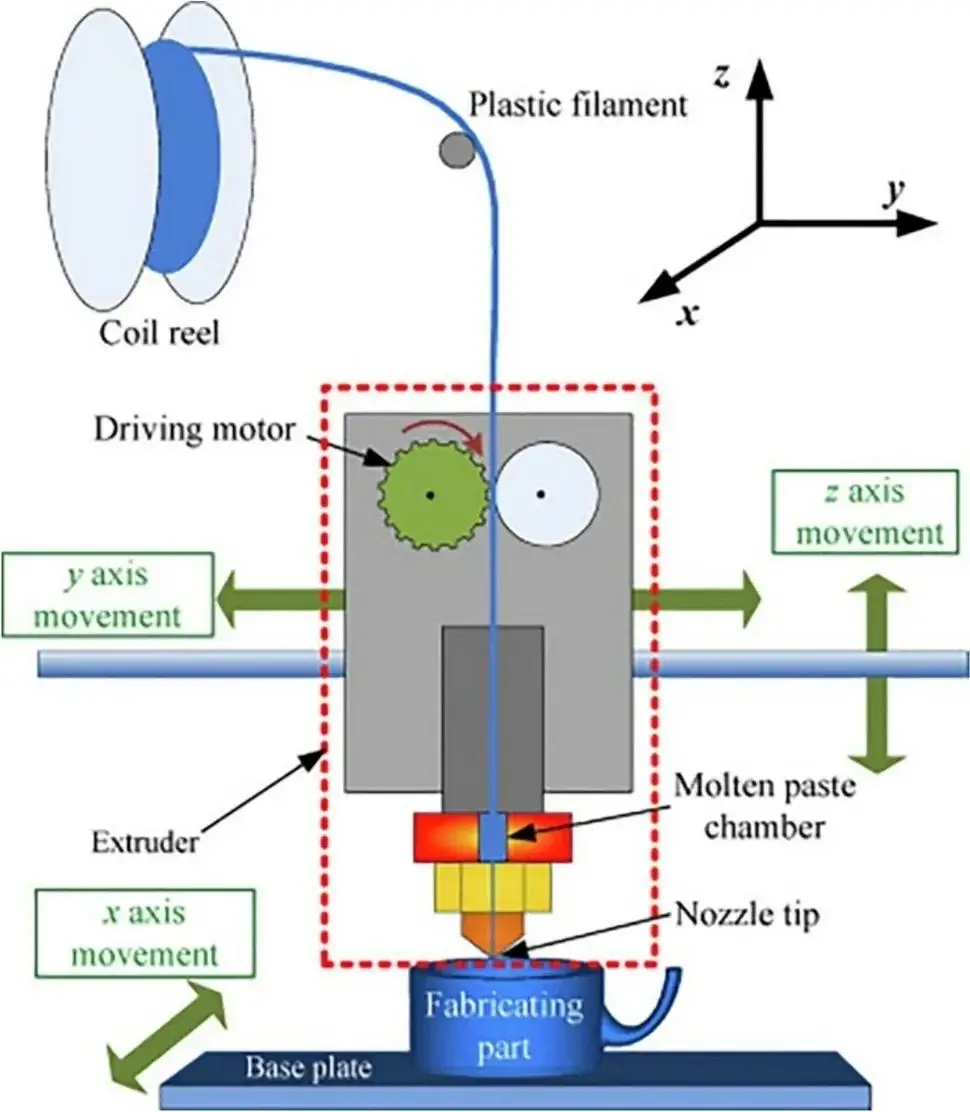
Frames, brackets, spool holders, and cable guides print well, while motors, rods, rails, and the hot end are bought as hardware. Plan your build around printed structure plus a short list of standard parts you purchase, and keep the bought list small and common.
Use a proven open-source design
Start from a tested, open-source printer design with free files and known measurements. A proven plan saves you from design errors and gives you accurate part files to print, so you skip the trial-and-error of inventing your own geometry.
Check the build volume of your printer
Confirm each structural part fits on the printer you will use to make it. If a frame piece is too large, split it into sections or choose a design sized for your machine.
Prepare the Printed Parts for Strength
Structural parts carry the machine and its moving parts, so they must be strong and accurate. Print them with the right settings.
Choose a strong material and enough infill
Print structural parts in a tough material like PETG or ABS, with a solid fill and enough walls to resist load. A weak part can warp or break and ruin the whole machine.
Print at a steady speed and fine enough layers
Keep a moderate speed so layers fuse well, and use layer heights that balance accuracy and strength. Holes and slots must stay true for the machine to assemble cleanly.
Account for Accuracy and Fit
A printer built from printed parts only works if the parts fit together precisely. Tolerances matter more here than for any cosmetic sample.
Check the printed dimensions against the design
Measure key holes and slots and confirm they match the design before assembly. Adjust your file for shrinkage if a part comes out tight or loose, so every joint fits.
Keep clearance where parts move
Leave a small clearance for shafts, rods, and bearings so moving parts slide freely, while fixed parts press or bolt in tight. Getting this balance right makes the machine run smoothly.
Print the Full Part Set in Order
Assembling a printer takes many parts, so organize your printing to keep the build moving.
Start with the frame, then the brackets
Print the main frame pieces first, then the brackets and mounts, and finish with the small guides and covers. This order lets you assemble as you go and spot fit problems early.
Print spares for the parts that wear
While you are at it, print a spare of each bracket and guide that tends to break. Spares on hand keep the new printer running when a part eventually wears out.
Assemble the Machine From Printed and Bought Parts
With the parts printed, assembly turns them into a working machine. Take your time here, because the way parts fit now decides how well the printer prints later.
Fit the hardware and check alignment
Mount the motors, rods, and hot end into the printed frame, and check that axes move straight and smoothly. Fix any misalignment now before you try to calibrate, so the machine does not fight itself during a job.
Wire and set up the electronics
Install the control board and wiring, then load the firmware and confirm each axis moves the right way. A clean electronic setup is what makes the printed machine actually print, so verify every connection before you power up.
Keep the frame square and tight
Make sure the frame is square and the bolts are snug but not overtightened. A twisted frame produces bad parts no matter how good your files are.
Calibrate and Test the New Printer
A newly built printer needs careful setup before it can produce good parts.
Level the bed and calibrate the steps
Level the build plate and calibrate the axis steps so the machine moves the right distances. A quick test print confirms the calibration before you trust it with real sampling.
Print a test part and adjust
Run a small test part, check the first layer and the dimensions, and adjust the settings. Once it prints cleanly, your new machine is ready to join the sampling line.
Conclusion: One Printer That Makes More
Knowing how to print a 3d printer turns one machine into a growing set of tools. Print the structural parts with strong settings, assemble them with bought hardware, and calibrate carefully.
The shops that grow their sampling capacity are the ones that build their own machines and learn the process deeply. Master the build, and the power of the maker shows itself in every machine and every sample you deliver.
how to print 3d printer
Related Article